

Why Image Cropping and Resizing Matter ?
The image is now one of the key aspects of digital communication. When you create your blog, run an online store, post on social media, or publish videos on YouTube, the appearance of your images may affect their engagement.
Creating a great image goes beyond taking a picture. The editing process, including cropping and resizing, may significantly improve the image quality, its composition, and usability.
Acquiring skills of proper image file cropping allows you to get rid of unwanted spaces, crop the picture in a better way, and emphasize the most interesting part of it. At the same time, applying a picture resize calculator makes it possible for you to change the image dimensions while keeping the proportions and quality intact.
When it comes to YouTube channels and digital marketing, there is no problem without a YouTube image resizer.
There are plenty of users who upload images without paying attention to their size, aspect ratio, and the needs of the particular platform. It results in blurriness of visuals, improper formatting, slow loading of web pages, and a bad user experience.
What Does It Mean to Crop an Image?
Understanding the Concept of Image Cropping
Image cropping is the act of eliminating parts of the image that aren’t necessary and leaving only the parts needed on the picture. Cropping alters the composition of an image and guides the viewer’s eye to focus on the key subjects.
In other words, cropping can be described as editing the photograph’s composition right after it was taken. The actual content of the picture does not change; all you do is select the needed parts of the photograph.
For instance, a portrait photograph can have too many spaces between the figure and the borders of the photograph. With the help of cropping, those unnecessary parts will be eliminated.
Cropping is widely used by:
- Photographers to improve composition
- Businesses to prepare product images
- Designers for marketing materials
- Bloggers for website visuals
- Content creators for social media
A simple crop can completely transform an ordinary photograph into a more professional-looking image.
Why Is It Important to Crop Image Files Properly?
Improves Image Composition
Composition is one of the major reasons why professionals edit pictures by cropping them. Composition means how things are arranged inside the frame.
A picture might have a great subject but have many empty areas or distracting features. A good crop will provide for the balance and allow the eyes of the viewer to move to the most important parts of the picture.
Professionals usually add extra space in their pictures when shooting because they are aware that they will be able to adjust the composition later on during post-processing.
Removes Unwanted Distractions
Even carefully captured photographs can contain unwanted elements that reduce their impact.
A background object, random person, or unnecessary empty area can make an image look less professional. Using an image cropper allows you to remove these distractions and create a cleaner visual experience.
Common distractions include:
- Unwanted background objects
- Excess empty space
- Random people
- Visual clutter
By removing unnecessary elements, the main subject becomes more noticeable.
Helps Images Fit Different Platforms
All platforms have their own image specifications. The picture that is appropriate for one website can look distorted on Instagram, Facebook, or YouTube.
Using cropping, you are able to tailor your image for different uses without taking the trouble to create separate pictures.
Thus, while one image may be good for a web banner due to its width, the other one may serve as a square-cropped image on social media. Consequently, cropping is an indispensable element of today’s digital content generation.
Crop Image vs Resize Image: Understanding the Difference
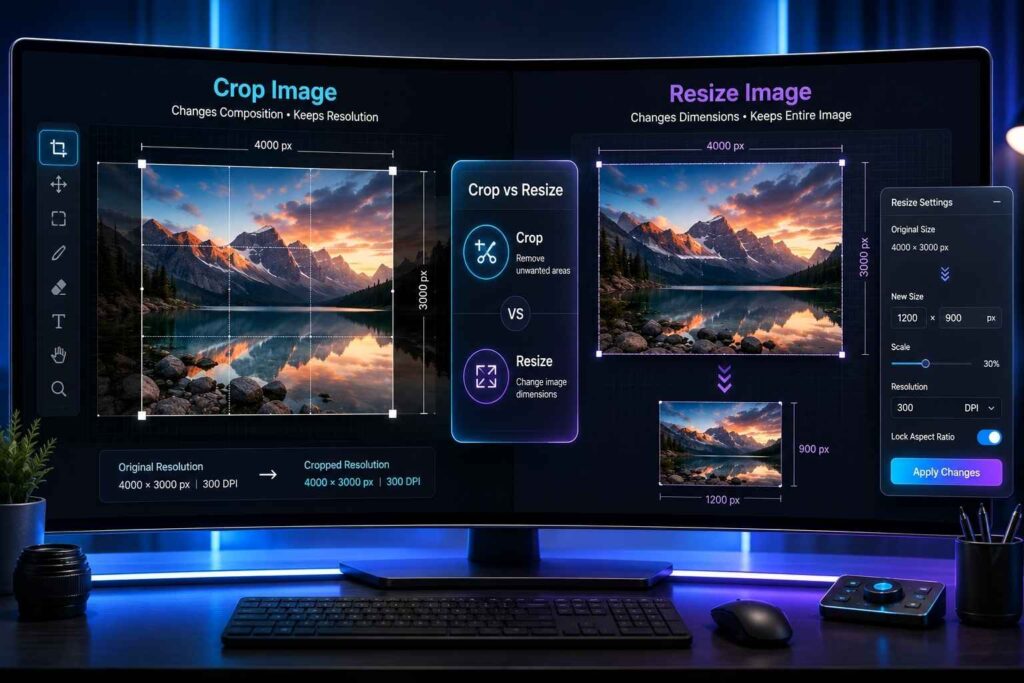
What Happens When You Crop an Image?
In cropping, the unnecessary parts in the picture’s borders are trimmed off. The contents that are left unchanged will have a different composition.
As an illustration, when a product photograph has excessive background near the product itself, the cropping process eliminates the extra space and highlights the product.
What Happens When You Resize an Image?
Resizing changes the width and height of the entire image without removing any part of it.
For example, a website may require an image size of 1200 × 630 pixels. Resizing allows you to adjust the image dimensions to match those requirements. Although cropping and resizing are different processes, they are often used together.
A professional workflow usually involves:
- Cropping the image to improve framing
- Resizing it according to platform requirements
- Optimizing the final image for better performance
This approach creates high-quality visuals without unnecessary quality loss.
Common Uses of Image Cropping
Product Photography
Online enterprises rely greatly on product images since there is no way for customers to inspect the products prior to purchasing.
This will help businesses maintain consistency in their product images by centering the products and eliminating extraneous background from the pictures.
It makes the product image look professional.
Social Media Content
Social media platforms display images in specific formats. Incorrectly sized images may cut off important details or appear unprofessional.
Creators use cropping to prepare images for:
- Instagram posts
- Facebook graphics
- LinkedIn banners
- Pinterest content
- YouTube thumbnails
A properly cropped image ensures important details remain visible.
Website and Blog Images
Websites often require images with specific dimensions for banners, featured images, and article sections. Cropping helps create visuals that fit perfectly into website layouts while maintaining a professional appearance.
What Is a Picture Resize Calculator?
Understanding Image Resize Calculators
Picture Resize Calculator is a special program designed to help calculate the correct image size during the process of image resizing.
It often happens that users manually adjust the image size by altering both width and height, which causes image distortion and gives a natural-looking picture an unnatural appearance.
However, using a resize calculator allows one to calculate the correct image size without distorting the initial proportions.
For instance, if the user decreases the image width, the program automatically finds out what the new height of the picture.
Benefits of Using a Picture Resize Calculator
Maintains Proper Image Quality
Incorrect resizing can make images appear stretched, compressed, or blurry. A picture resize calculator helps maintain proper proportions, ensuring that images continue to look natural after resizing.
Saves Time During Editing
Calculating dimensions manually can be confusing, especially when handling multiple images.
A resize calculator provides accurate measurements instantly, helping designers, marketers, and content creators complete editing tasks more efficiently.
Creates Platform-Ready Images
Different platforms require different image dimensions.
Using a resize calculator helps prepare images for:
- Websites
- Online stores
- Social media platforms
- Presentations
- Video thumbnails
Understanding Image Dimensions and Aspect Ratio
What Are Image Dimensions?
Image dimensions refer to the height and width of an image in terms of pixels. For instance, an image with dimensions 1920 x 1080 consists of 1920 pixels across the horizontal axis and 1080 pixels across the vertical axis. Larger dimensions will give you more information, although they’ll also lead to larger file sizes.
Why Aspect Ratio Matters
The aspect ratio is the ratio of the image’s width to its height. Observing the right aspect ratio helps to ensure that there is no distortion of the image. YouTube thumbnails, for instance, need to be wide images, while profile images should mostly be squares.A good picture resize calculator will help one achieve the right aspect ratio when resizing the image.
What Is a YouTube Image Resizer?
Preparing Images for YouTube Content
A YouTube image resizer is a tool that adjusts images according to YouTube’s recommended dimensions.
Creators use these tools to prepare:
- Video thumbnails
- Channel banners
- Profile images
- Promotional graphics
A properly resized image remains clear and professional across desktops, tablets, and mobile devices.
Why YouTube Image Size Matters
A thumbnail is often the first thing viewers notice before deciding whether to watch a video.
A poor-quality thumbnail may appear blurry, incorrectly cropped, or difficult to understand. This can reduce viewer interest.
Using a YouTube image resizer helps creators maintain:
- Clear visuals
- Readable text
- Professional branding
- Consistent appearance
A well-prepared thumbnail creates a stronger first impression and improves the overall quality of a YouTube channel.
How to Crop and Resize Images Like a Professional
Follow the Right Editing Process
Creating a professional-looking image requires more than simply changing its size. The order in which you edit your image can affect the final quality. A proper workflow helps maintain clarity while making sure the image fits its intended purpose.
The first step is understanding where the image will be used. A YouTube thumbnail, website banner, product image, and social media post all require different dimensions and compositions.
Before resizing, it is usually better to crop image areas that do not contribute to the main subject. Once the composition is improved, you can resize the image according to the required dimensions.
This process prevents unnecessary quality loss and ensures that your final image looks natural.
Step-by-Step Process to Crop Image and Resize Photos
Step 1: Choose the Main Focus of the Image
Before making any changes, identify the most important element in your photo.
Ask yourself:
- What should viewers notice first?
- Which part of the image communicates the main message?
- Are there any unnecessary areas that distract from the subject?
For example, in product photography, the product should always remain the center of attention. In portrait photography, the person’s face and expression should be the primary focus.
A clear understanding of the subject helps you create better crops.
Step 2: Remove Unnecessary Areas
After you have identified the central theme, trim the surrounding areas from it. A proper crop removes extraneous elements without leaving the photo looking incomplete. Don’t crop anything that is integral to your picture like faces, product outlines, or necessary background information.
The aim is not only to reduce the size of the photo. It is to improve the photo. Professional editors regularly apply the crop feature to achieve a visual hierarchy whereby the viewer’s attention is drawn to the most important element.
Step 3: Maintain the Correct Aspect Ratio
After the crop process, choose the right aspect ratio depending on the place where the image will be posted.
The platforms present images in different ways. Choosing the wrong aspect ratio could lead to automatic cropping, distorted visuals, or loss of key information. For instance, a YouTube thumbnail needs a wider aspect ratio while social media profiles need square aspect ratios. One can use a picture resize calculator to get the exact measurement.
Step 4: Resize Without Losing Quality
Once the cropping is done, scale the picture depending on your needs. Do not scale up a small picture to a very large one, since that will lead to blurring. It is always better to begin with a higher resolution picture wherever possible.
When scaling up, remember to keep the aspect ratio the same. Altering the dimensions independently will give the picture an unnatural appearance. There are modern techniques for automatically maintaining the ratio while scaling.
Best Practices for Maintaining Image Quality
Start With a High-Resolution Image
The final output is very dependent on the quality of the initial image.
An image that has high resolution will give you the ability to crop and resize easily since it will not become pixelated when some parts are removed.
High-quality images are stored by professional photographers and companies while others are created for various purposes.
Avoid Excessive Cropping
Even though cropping enhances composition, excessive cropping of images may lead to poor quality of images.
When you crop a small image extensively, the number of pixels available for presenting the subject in that image will be low, leading to a blurred image, especially when viewed in a large screen size.
Use the Correct File Format
The file format also affects image quality and performance.
Common formats include:
- JPEG: Suitable for photographs because it provides good quality with smaller file sizes.
- PNG: Useful for graphics, transparent backgrounds, and images containing text.
- WebP: A modern format that provides excellent quality with smaller file sizes, making it useful for websites.
Choosing the right format ensures your images remain sharp while loading efficiently.
Common Image Cropping Mistakes to Avoid
Cropping Too Close to the Subject
Another frequently made error is taking away too much room around the subject. Although a tight crop can be an effective way of adding impact, it can also give an unpleasant and incomplete feeling. When taking portraits, do not crop the picture too tightly around key areas such as the face, shoulders, or hands unless you want a tight crop. With product photos, leave sufficient room around the product for ease of viewing.
Ignoring Mobile Display
While many tend to optimize their photos for desktops alone, a majority of users access content using mobile devices.
An image that appears well on a computer may appear distorted when viewed on a mobile phone. Ensure that your image is appropriate for all types of screen sizes.
Using the Wrong Image Dimensions
Large file sizes for the pictures might slow down the website, while using small file sizes can make the pictures look bad.
This is where the image resizing calculator comes in handy to calculate the perfect dimensions of the image before you upload it.
How a YouTube Image Resizer Helps Content Creators
Creating Better YouTube Thumbnails
YouTube thumbnails are one of the most important factors influencing clicks. Before watching a video, viewers usually see the thumbnail first.
A properly designed thumbnail should be:
- Clear and easy to understand
- High quality
- Visually attractive
- Properly sized for all devices
A YouTube image resizer helps creators prepare thumbnails that maintain sharpness and correct proportions.
When important elements such as faces, text, or products remain visible, viewers can quickly understand the video’s topic.
Improving Channel Branding
Consistency is a vital part of creating a distinct YouTube channel.
People who apply the same styles of images, dimensions, and layout are able to develop their brand better.
A YouTube image resizer tool allows for keeping the sizes of thumbnails, banners, and other channel pictures consistent.This will help create a more professional appearance.
Image Cropping and SEO: How Optimized Images Help Websites
Better Website Performance
Optimization of images is an essential part of website optimization. The use of large images that have not been optimized increases loading time, resulting in poor user experience. Images that are properly cropped and resized have reduced file size without losing quality. Fast-loading websites lead to better visitor experience and are key in search engine optimization.
Improved User Experience
Visitors prefer websites that are visually appealing and easy to navigate.
Well-sized images fit naturally within website layouts and prevent issues such as:
- Slow-loading pages
- Broken layouts
- Blurry visuals
- Poor mobile experience
Using optimized images creates a smoother browsing experience.
Better Image Search Visibility
Search engines use image information to understand visual content.
To improve image SEO, businesses should focus on:
- Descriptive image file names
- Relevant alt text
- Proper dimensions
- Optimized file sizes
A correctly cropped and resized image provides better context and improves accessibility.
Choosing the Right Image Resizing and Cropping Tool
Features to Look For
The best editing tool depends on your requirements, but a reliable tool should provide accurate results and an easy workflow.
Important features include:
- Simple interface
- Multiple size options
- Aspect ratio control
- High-quality output
- Fast processing
- Support for common image formats
For beginners, an easy-to-use tool with automatic calculations is often the best choice.
For professionals, advanced controls and batch editing features can save time when managing large numbers of images.
Future of Image Cropping and Resizing Technology
AI-Powered Image Editing
Image editing is becoming faster and smarter with artificial intelligence.
Modern tools can automatically detect subjects, suggest better compositions, and recommend ideal crops.
AI-based features can help users:
- Identify important objects
- Automatically adjust framing
- Resize images for multiple platforms
- Improve image quality
These technologies make professional editing accessible even for beginners.
Automatic Platform Optimization
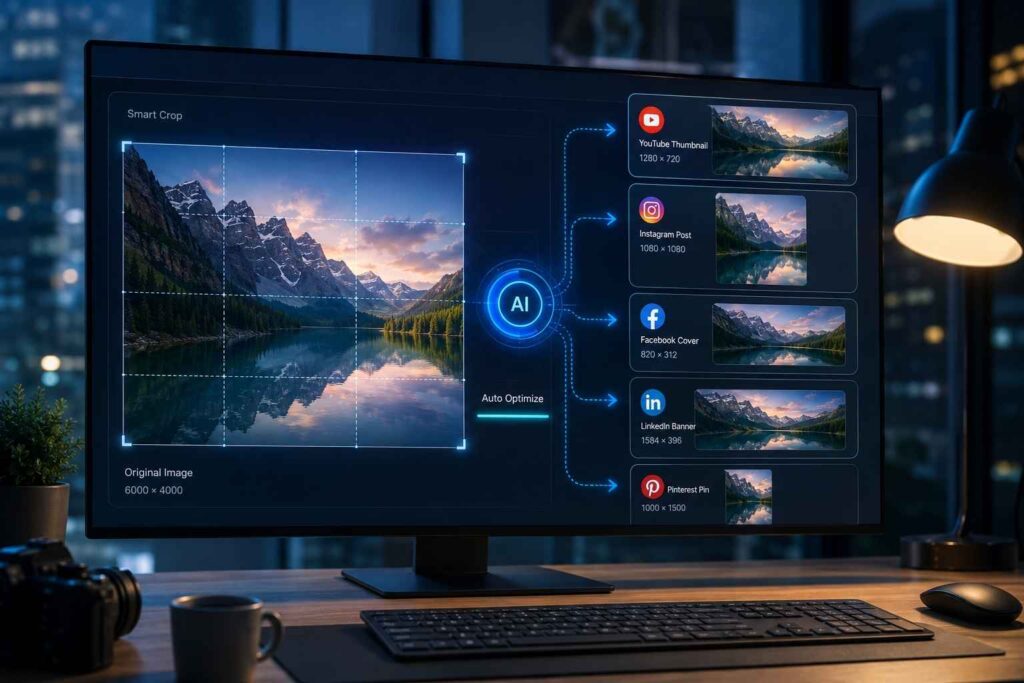
Future image editing applications will be increasingly integrated with digital platforms. Users no longer need to manually select image dimensions; they only need to select where they want to post their image, and the application will automatically format the image. For instance, by choosing “YouTube thumbnail” or “Instagram post,” the application will automatically provide the right image dimensions and cropping.
Final Thoughts
It is very important to know how to crop images and adjust their size in today’s world of digital images. As a photographer, businessman, marketer, blogger, or YouTube content creator, using properly optimized images will allow you to be more effective in your work.
With cropping, you’ll remove all unnecessary parts of an image and highlight important elements. Resizing allows you to create perfect images that will fit all platforms well.
There are many tools that can be used for the process, like a picture resize calculator, which helps keep correct proportions. For example, YouTube image resizer will allow you to create high-quality thumbnails for your channel.
In order to have success with your image editing, it is not enough just to make your images smaller or change its dimensions. You need to create good-looking, high-quality visuals for your viewers.
TAGS
