

Editing photos has greatly changed from the era when it required mere adjustment of the brightness, contrast, colors, or the background on a conventional editing app. Nowadays, AI makes photo editing simpler and more accessible to various audiences including photographers, companies, e-commerce businesses, and ordinary users.
AI technology helps to perform a lot of operations that would take hours of hard manual work, like automatic removal of unwanted items, authentic image production, and the improvement of image quality. This also transforms the work of photo editing services as they can now process a bigger amount of photos without compromising quality.
So whether you are a photographer, online seller, an agency, or just a person who needs better photos, knowing the AI photo editing will help you find appropriate applications and services.
How Can I Use AI for Photo Editing?
AI can play a role in almost every aspect of photo editing. Rather than spending all your time making adjustments manually, you can take advantage of AI technologies that let you automate tedious tasks and make your workflow more efficient.
Below are some of the most common applications of AI in photo editing.
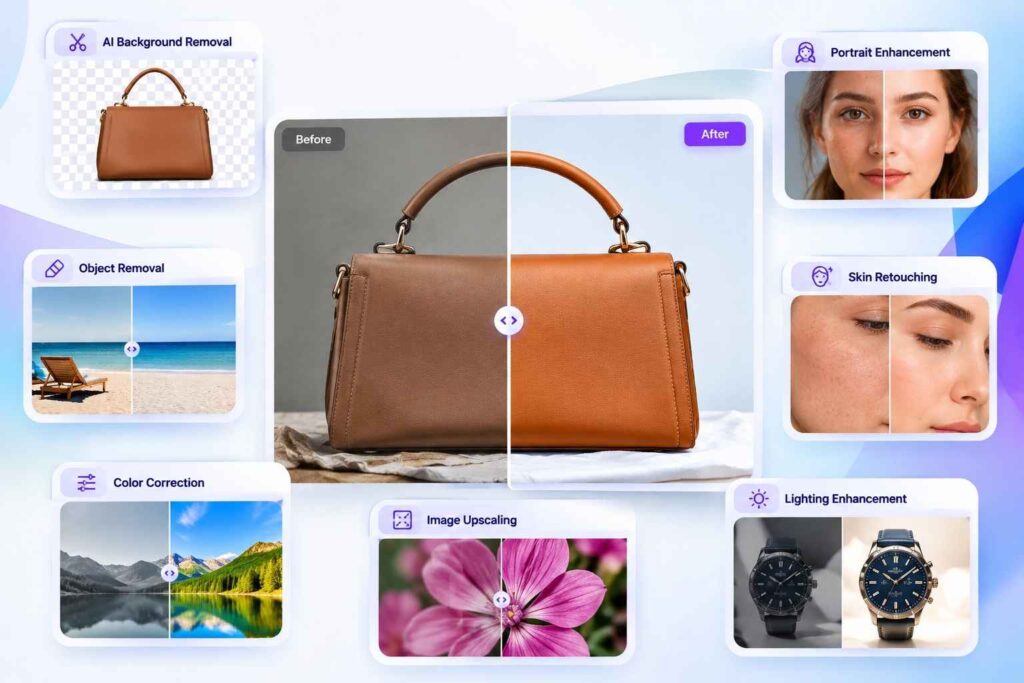
1. Remove Unwanted Objects
One of the most significant advantages of AI is the possibility to remove unnecessary objects or distractions from the pictures.
For instance, when there are some people, signs, wires, trash bins, or any other undesired elements in the photo, an artificial intelligence-based removal tool can find out where it is and fill that area with the surrounding details.
It is especially useful for real estate photos, product images, wedding photos, travel pictures, and so on because unwanted objects could distract the audience.
2. Change or Remove Backgrounds
AI background removal has gained immense popularity in the fields of eCommerce and photography.
Traditional background removal often entails painstaking selection around hair, fabrics, jewelry, and other complex edges that require precision. AI technologies automatically identify the subject of an image and separate it from the background in seconds.
After removing the background, you can replace it with:
- A plain white background
- A transparent background
- A professional studio setting
- A lifestyle scene
- A custom-colored background
- An AI-generated environment
For online stores, this can save significant time when preparing hundreds or thousands of product images.
Professional photo editing services can also combine AI background removal with manual refinement to achieve cleaner and more accurate results.
3. Improve Image Quality
AI image enhancement technology can upgrade a low quality image.
Some AI tools increase the image resolution, make it sharper, decrease noise and recover certain details from an image. This is especially useful in case with old photographs, with compressed files or in case of low light, and similar complicated situations.
However, AI enhancement technology is not magic. In case the original picture doesn’t provide sufficient information, AI will have no other option but to generate the needed information rather than to restore the originally existing details. Therefore, it is crucial to have commercial photos evaluated by a professional.
4. Retouch Portraits
Portrait retouching is another area where AI can save time.
AI-powered tools can automatically detect faces and help with tasks such as:
- Skin smoothing
- Blemish removal
- Teeth whitening
- Eye enhancement
- Hair adjustments
- Facial lighting
- Wrinkle reduction
- Background adjustments
The essential thing is to use these features with caution as over-retouching can render a person’s features with an unnatural look.
In general, professional editors take advantage of AI as a support tool rather than solely relying on automated editing, which ensures a more realistic outcome.
5. Restore Old Photos
AI restoration of photographs can revive old and damaged images to life.
Depending on the software used, AI can mend scratches, lower noise, increase contrast, sharpen human faces, as well as colorize black-and-white photos. Thus, it can be beneficial for both professional photography and personal family archives.
6. Create or Expand Backgrounds
Generative AI has the ability to produce entirely new imagery or expand upon existing photographs past their original limits.
For example, if you have a product photograph that is very tightly cropped, generative tools can create backgrounds that allow more space for advertising copy or social media designs to be inserted in.
This feature can benefit marketers who require the same photograph in several different sizes.
Any AI Photo Editing Apps That Work Well?
Yes. There are now many AI-powered photo editing applications and software platforms available. The best choice depends on what you want to accomplish.
Some tools are designed for professional photographers, while others focus on quick edits for social media users and beginners.
Adobe Photoshop
Adobe Photoshop is still regarded as one of the strongest solutions when it comes to professional photo editing. Its built-in AI capabilities are beneficial for things such as removing objects, generating images, changing background images, or even expanding images.
Photoshop can be a helpful program for those who want automation and detailed manual control.
This mix is a great benefit to professionals in photo editing, since editors can use it to complete tedious tasks faster and then focus on the process of refining the image itself.
Adobe Lightroom
Adobe Lightroom is well known in the photography community because it allows for easy processing of high volumes of images. The software offers a range of AI-based capabilities to perform functions such as masking, subject and sky selection, noise reduction, etc. In particular, Lightroom is a perfect solution for photographers looking for reliable color corrections.
Canva
For novice users and marketers, Canva is a good alternative. Utilizing its AI-powered features, one can remove backgrounds, eliminate objects, create or change images, and develop marketing graphics without needing to know advanced skills in Photoshop.
Canva is a good option for social media posters as well as ads, presentations, and simple photo editing.
Luminar Neo
Luminar Neo is heavily focused on artificial intelligence tools for photography. Its capabilities include portrait enhancement, sky replacement, lighting manipulation, background editing, and other mainstream photography features. The program is aimed at making advanced editing easy to do by not requiring hours of learning complex editing techniques.
Photoroom
Photoroom serves as an invaluable tool for product photography and e-commerce.
By using its background removal and replacement feature, online merchants can quickly produce clear product photographs. The tool is also valuable for making coherent visual content for marketplaces, websites, ads, and social media.
AI-Powered Mobile Apps
There are also numerous AI photo editing apps available for smartphones. These are useful when you need to make quick adjustments while working from a mobile device.
Depending on the application, you may find features for:
- Background removal
- Portrait enhancement
- Object removal
- Filters
- AI effects
- Image enhancement
- Automatic color correction
Mobile apps are convenient, but professional photographers and businesses may still prefer desktop software when precise editing and high-resolution output are important.
Which AI Photo Editing Software Is the Best?
Selecting the ideal AI photo-editing tool is not feasible, as the right software is determined by a user’s budget, technical skills, and type of editing done.
For example, if one is seeking advanced editing capabilities, the right tool available is Adobe Photoshop, which is ideal for complex tasks, due to its traditional features and latest AI technologies.
For photographers who deal with lots of pictures, Adobe Lightroom would be more appropriate, as this tool was designed with photography in mind and takes care of the organizational and image processing aspects.
If designers require quick results, then Canva is an ideal tool. Canva comes in handy for business representatives who need ready-to-use pictures for their social media and advertising campaigns without the requirement of devising very complicated editing techniques.
In addition to editors seeking simplicity while employing AI technology, Luminar Neo would work well.
Although Photoroom is excellent software for e-com sellers, it helps pursue quick product adjustment.
It should be noted that picking software is only half the way of reaching perfection.
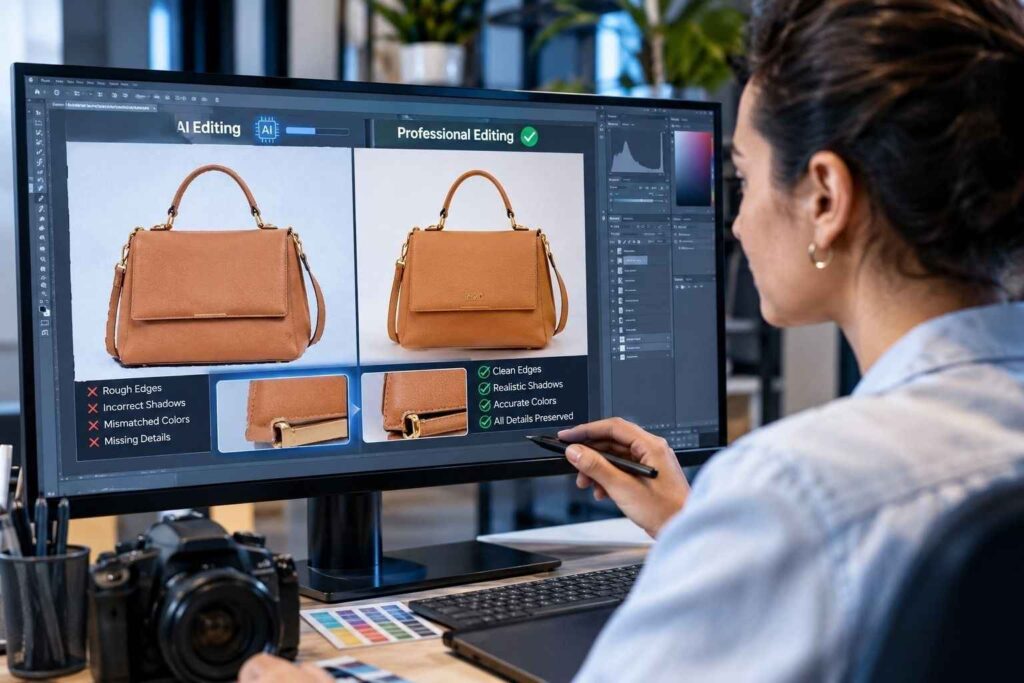
AI vs. Professional Photo Editing Services
Although AI can do most editing jobs in a short amount of time, relying on it in all cases is not a good idea.
For very simple jobs, AI can be sufficient. Removing a simple background from an image of a product is something AI can do automatically and effectively.
However, more complex images can be too nuanced for machines.
A skilled editor can notice mistakes that cannot be spotted by an algorithm, including unnatural edges, incorrect shadows, mismatching colors, mistreated details, and non-natural skin tones.
That is why present-day photo editing companies employ AI and use humans at the same time.
AI takes care of repetitious tasks, while an experienced editor checks everything and makes necessary corrections. The method combines the advantages of automation and integrity of human editing.
Benefits of Using AI in Photo Editing
AI offers several advantages for individuals and businesses.
Faster Editing
AI can complete repetitive tasks in seconds, allowing editors to process more images in less time.
Lower Production Time
Automating background removal, masking, enhancement, and other tasks can reduce the amount of manual work involved in an editing project.
Consistent Results
AI-powered workflows can help maintain similar editing standards across large batches of photographs.
Easier for Beginners
Many AI tools simplify advanced editing techniques, allowing beginners to achieve professional-looking results without extensive technical training.
Scalable Workflows
Businesses that regularly process large image volumes can combine AI tools with professional photo editing services to create a more scalable production process.
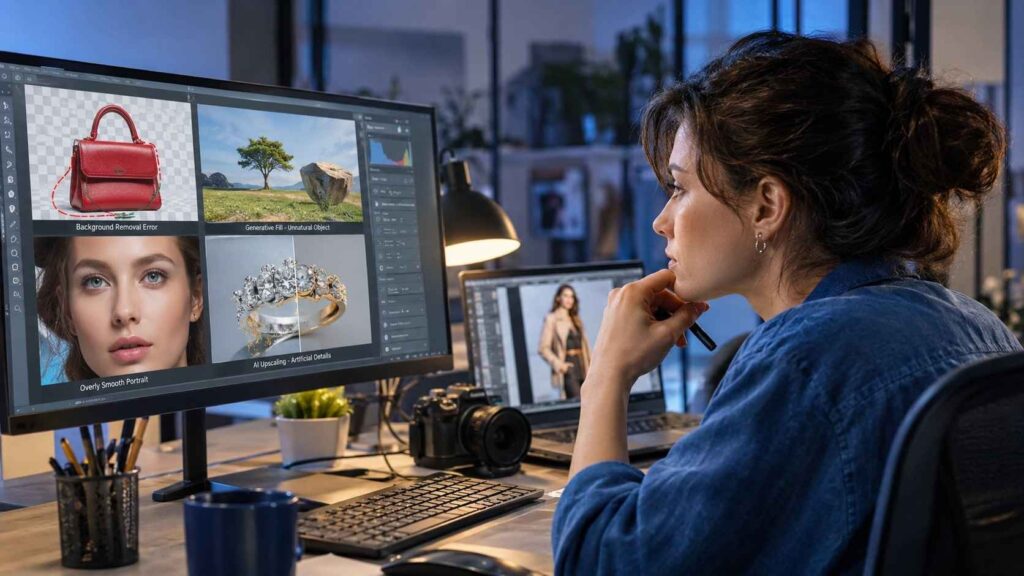
Are AI Photo Editing Tools Always Accurate?
Certainly, AI editing tools can produce errors.
As an illustration, a background erasing tool might delete portions of a product unintentionally. A generative fill tool might create an object that does not look realistic. Portrait enhancement may give the skin an unnatural appearance. Meanwhile, AI upscaling may add details that were absent in the original image.
AI editing mistakes can be accepted when dealing with casual photos. However, accuracy matters when it comes to professional photography, advertising, fashion, jewelry.
The Future of AI and Photo Editing
The photography field is poised for more impact from artificial intelligence in the future. Future innovations are expected to speed up time-consuming processes, making editing easier for customers.
The profession of photo editing will not, however, be completely eliminated. Instead, it is expected to change.
Instead of spending precious time on tedious tasks, photo editors will be able to take advantage of AI and spend their time on more important things, such as making creative choices and ensuring that photos meet clients’ standards.
For businesses this implies that companies that offer photo editing services will be able to do their work faster and at a higher quality level.
Final Thoughts
The field of photo editing has been revolutionized by AI where complex jobs can now be done in record time. AI tools can help you improve your workflow.
There are many applications like Photoshop, Lightroom, Canva, Luminar Neo, and Photoroom that have different AI technologies suitable for different users.
However, despite the effectiveness of AI in automating tasks, good editors apply their individual skills and creativity.
Whether it is about a few personal photos or thousands of images you need to edit, using both AI tools and professional services can lead you to success.
TAGS
