

Digital communication relies heavily on visuals. Images are an essential component of online businesses, social media content creation, marketing campaign design, and memory preservation. The quality of your image is critical in how recipients interpret your content.
A quality image that is clear and professional is more likely to grab a viewer’s attention than a low-quality image, which may create distrust or reduce engagement.Many people struggle to have a low-quality image due to image compression, improper camera settings, incorrectly resizing images, or downloading images from social media sites. Each of these conditions can result in an image that is blurry, pixelated, or has an overall poor appearance. Luckily, there are many modern AI- and machine learning-powered solutions available for restoring image quality and improving the visual clarity of images.
A good low-quality image converter can convert low-quality, blurry images into higher-quality, clear, professional-looking images. Conversely, some people use a low-quality image creator, quality reducer, or quality lower as a means by which to lower their image size for use on websites and in digital applications. By learning more about how image quality works, you can make informed choices about creating, editing, and optimizing visual content.
If you want to learn more about AI image enhancement and photo editing technologies, you can also explore our blog:
https://www.saivionindia.com/blog/face-editor/
What Is a low-quality image?
A low-quality digital image contains little or no sharpness, minimal detail, or lack of visual clarity. The digital image typically appears blurry, compressed, pixelated, or distorted. A small screen will appear more acceptable than when viewed on a large display or when printed.
There are many reasons images are of low quality based on factors such as resolution, light source, compression level, camera ability, and editing techniques. If one or more of these factors is not met, an image will lose important information and will not look professional.
Whether you are a business, photographer, marketer, or designer, you understand how important it is to have high-quality images. Having high-quality images builds trust, increases engagement, and helps support your brand image. A poorly produced image will damage the overall user experience and decrease the success of your marketing efforts.
Common Signs of a Low Quality Image
Some common indicators that an image may be low quality include:
- Blurry edges and details
- Visible pixelation when enlarged
- Loss of texture and sharpness
If you notice these issues, image enhancement tools can often help restore clarity and improve the overall appearance of the photo.
Understanding Low-Resolution Photos
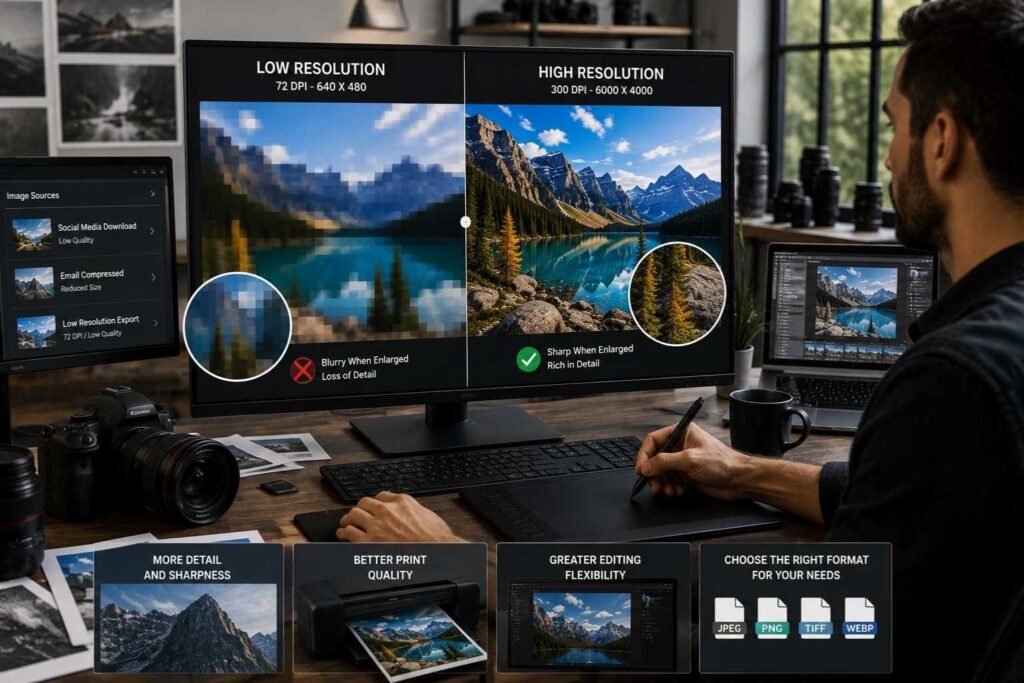
The resolution of a photograph is how much visual detail is held by an image. Resolution also determines the number of pixels found in an image. The higher the number of pixels contained in an image, the more detail can be provided in an image.
An image will generally still look okay at its original size if it is a low-resolution image. However, if the image is enlarged, it usually will be blurry or pixelated due to the lack of pixel information available to match the size of the new enlargement. This is an example of one reason that images may lose resolution when edited or resized.
Most images that are low resolution will be low in resolution because they were downloaded from a social media site, were compressed to send via email, or when they were exported as low-resolution settings. The trade-off for the lower-sized files is that image quality is also lower.
Why Resolution Matters
Higher-resolution images provide several benefits:
- More detail and sharpness
- Better print quality
- Greater editing flexibility
Understanding resolution helps users choose the right image formats and enhancement methods for their specific needs.
Why Do Images Become Low Quality?
The reasons for degraded images can be countless. To fix the issue, first you must know what the problem is. The most common cause of a degraded image is excessive compression. Many social networks, web services and messaging applications have automatic image compression in place to help speed up load times, but this often removes pixel data that can affect image quality.
Another common issue that can cause degraded images is improper resizing. Using an up-scaling technology to enlarge a small image makes the allowable amount of pixels larger which can lead to losing clarity in an image. In addition, thumbnails and screenshots tend to be too small to provide adequate detail or quality for a professional image usage.
Common Causes of Low Quality Images
The most frequent causes include:
- Excessive image compression
- Incorrect image resizing
- Poor lighting conditions
Additional factors such as camera movement, low-end sensors, and repeated JPEG saving can further reduce image quality over time.
What Is a low-quality image converter?
A low-quality image converter can improve the quality of images by restoring lost detail, enhancing sharpness, reducing noise, and adding clarity to the overall image. This type of tool is particularly useful for repairing blurry or compressed images and images that are low resolution.
Today’s image converters frequently employ artificial intelligence (AI) systems to identify patterns in an image and generate the visual detail missing from the original photo. Unlike conventional software that simply expands pixel size, AI-based conversion programs create more realistic detail within images, thus improving the quality of the final product.
Photographers, graphic designers, ecommerce companies, digital marketers, and any content creator who desires pictures that appear to be taken professionally have all found these products helpful.
How AI Improves Low Quality Photos
Image enhancement technology is now more widely available and can be enhanced using AI technology. AI systems analyze millions of images and predict missing elements through the use of machine-learning algorithms, providing enhanced image quality.
When enhancing a low quality photo, AI provides: Sharper edges, Improved facial features, Reduced noise, Restored textures. Besides enhancing and improving these attributes, many of the advanced tools can identify specific parts of every image (eyes; skin; hair and background). As a result, targeted enhancements are made possible.
Benefits of AI Image Enhancement
AI-powered image enhancement provides several advantages:
- Improves image sharpness
- Restores lost details
- Reduces digital noise
Because of these capabilities, AI has become one of the most popular solutions for improving image quality quickly and efficiently.
What Is a Low Quality Image Maker?
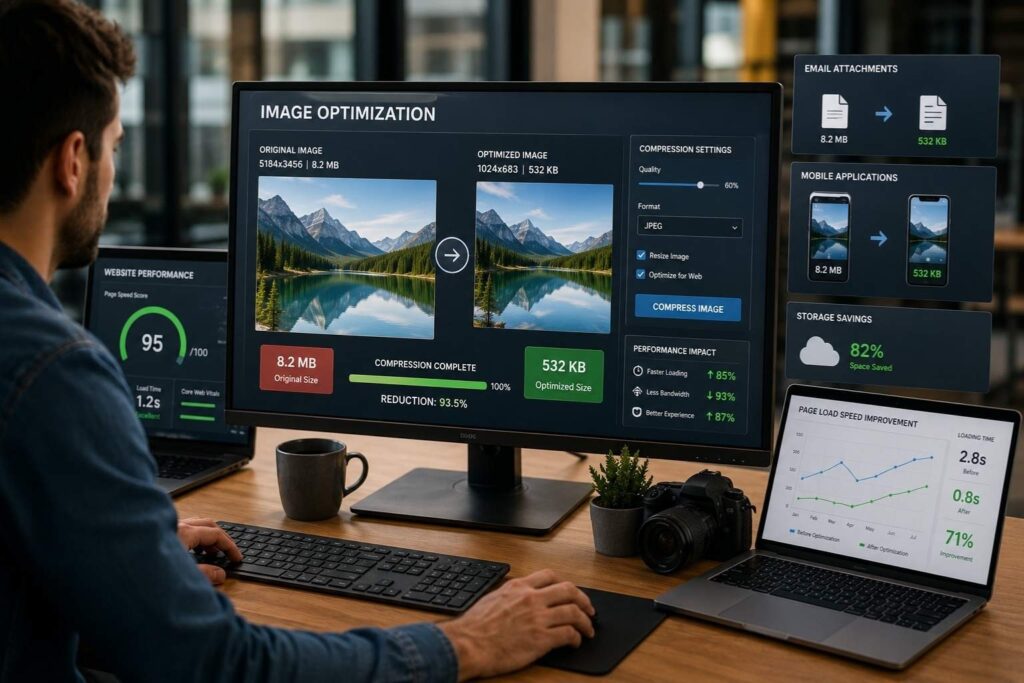
A low-quality image maker does what it says on the label; it makes images of low quality intentionally. This may seem counter-intuitive to you, but think about how many times you’ve needed a smaller image file due to practical reasons!
Website owners often use low-quality images on their websites in order to increase website speed. Smaller files require less bandwidth, and therefore, websites will load faster and respond faster. Faster loads can lead to better user experiences and higher search engine rankings.
Low-quality image creators will typically reduce the resolution of an image, compress an image, or create an optimized format to reduce the size of an image file. The main objective is usually to keep an acceptable visual quality while reducing storage space.
When to Use a Low Quality Image Maker
Common use cases include:
- Website optimization
- Email attachments
- Mobile applications
By reducing image sizes strategically, users can improve performance without significantly affecting appearance.
Understanding Quality Decreaser and Quality Lowerer Tools
Tools for lowering/ decreasing quality and reducing an image’s quality typically exist to reduce the size of images. These tools are used by web developers, marketers, and designers trying to optimize their images for online use.
By lowering the quality of an image, it can help improve the performance of a website by lower page weight (fewer bytes to download) and reduce the load time to view web pages on devices such as mobile phones and websites with many images (e.g., galleries).
Extreme lowering of the quality of an image can result in fuzzy or unclear images, which can impact the user experience negatively. Therefore, it is critical to consider the relationship between the desired quality of images and the performance needs of images, and balance the two appropriately.
Best Practices for Managing Image Quality
Whether you are improving or reducing image quality, following best practices can help achieve better results.
Tips for Better Results
- Start with the highest-quality source image
- Avoid excessive compression
- Use AI enhancement before resizing
High-quality source files provide more information for editing and enhancement. AI tools perform best when they have sufficient detail to work with, making original image quality an important factor.
It is also important to save images using appropriate formats and quality settings. Testing different compression levels can help identify the optimal balance between file size and visual appearance.
Industries That Benefit From Image Enhancement
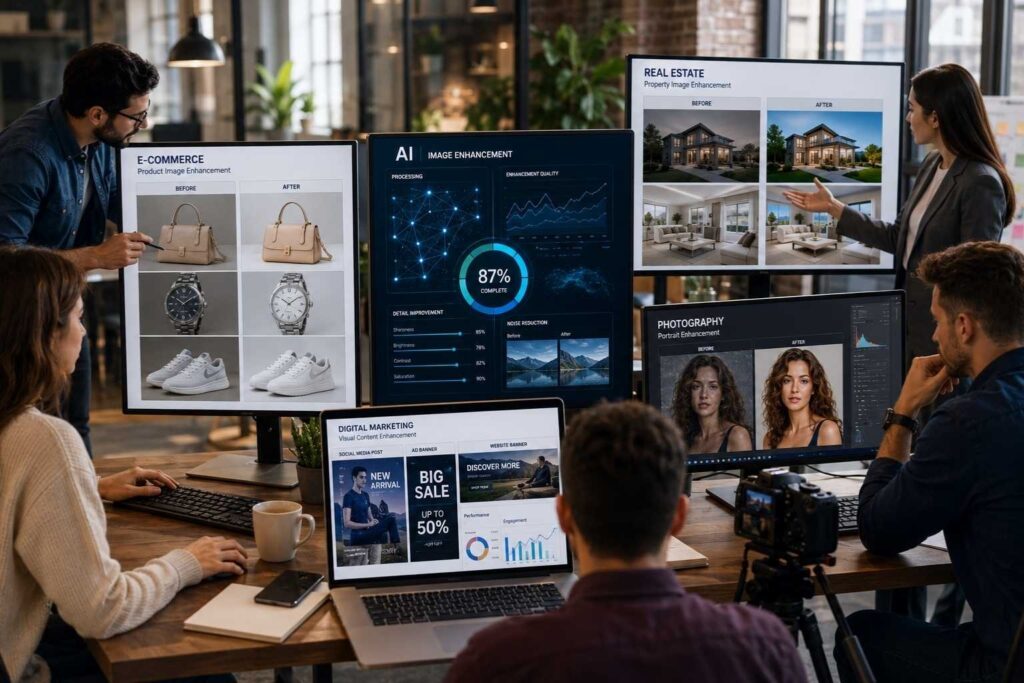
Image enhancement technologies are used across a wide range of industries.
ECommerce
Online retailers rely on high-quality product images to attract customers and increase conversions. Clear visuals help shoppers evaluate products more confidently.
Real Estate
Property listings benefit from enhanced images that showcase rooms, architectural features, and outdoor spaces in the best possible light.
Photography
Professional photographers use image enhancement tools to improve portraits, restore old photographs, and deliver polished final results.
Digital Marketing
Marketing campaigns depend on strong visuals to capture attention and communicate messages effectively.
Conclusion
Tools such as quality reducers and quality reducers help to decrease the quality of the photo but decrease file size at the same time. Web developers, digital marketers, and designers regularly optimize photos with these tools for use on the web.
Reducing image quality increases the rate of speed for a webpage by lowering the overall page weight and decreasing the loading time of the webpage. This is especially true for websites with large images or for mobile users.
Using these types of programs is best used when you have an adequate understanding of how they work, as excessive quality reduction may create blurry images as well as provide a poor user experience. The optimal solution for quality and speed will be to have both at a balanced level.
TAGS
